
Family menu in one app
The whole family shares one pantry, one shopping list and one weekly plan. The list shows who's already grabbed what, and the pantry shows what's at home.
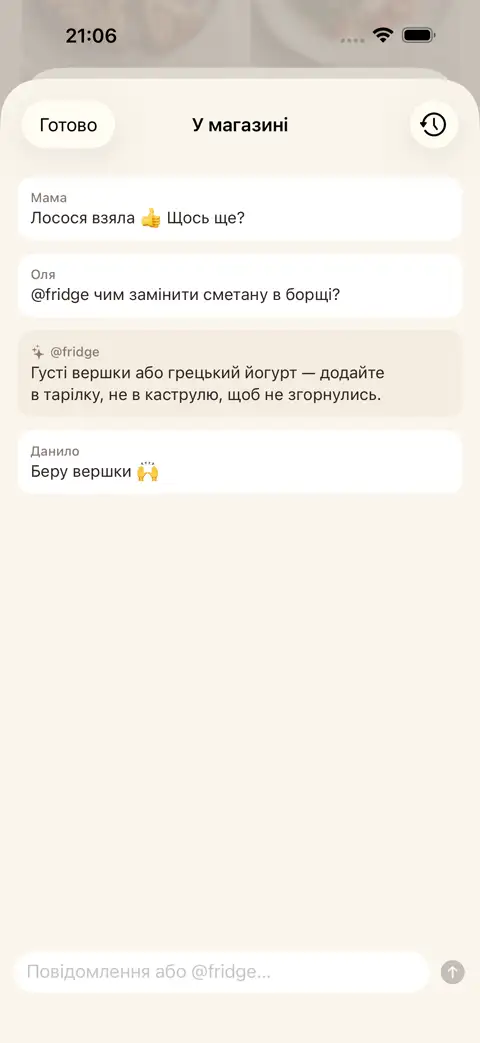
One pantry, one list, one plan — for the whole family
Invite your family with a QR code or by holding phones close together. In the shop, shared shopping mode shows who's already picked up what, and you can ask @fridge in chat.
A weekly plan for the whole family
With Fridge.Menu, you can build a weekly menu from what's already at home and what your family likes. Anything missing for the plan goes straight into the shared shopping list.
Steps
- Invite your family with a QR code or simply hold your phones close together
- Add items to the pantry by typing or scanning a barcode — everyone sees what's at home
- Plan the week together: anything missing for the plan goes straight into the shared shopping list
FAQ
How do I invite family to a shared pantry, list and plan?
Invite your family with a QR code or by holding phones close together. The whole family will share one pantry, one shopping list and one plan.
Can the family see who's already picked up what in the shop?
Yes, shared shopping mode shows who's already grabbed what.
Do I need to sign up to use the app?
No, sign-up is not needed. Signing in with Apple is only required to sync across devices.