Track your groceries at home and get expiry reminders
Add groceries by scanning a barcode or just typing the name — Fridge.Menu keeps track of them and reminds you when something's about to spoil.
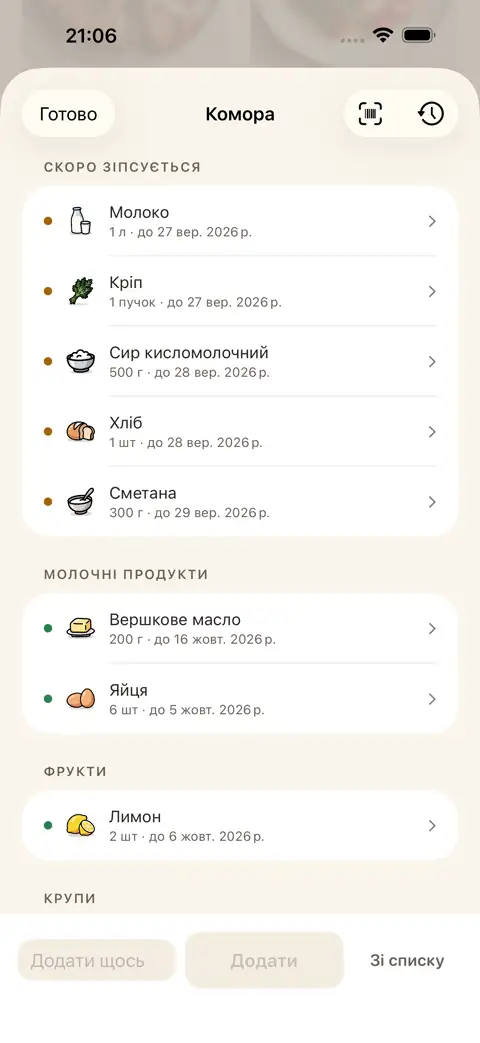
A pantry that reminds you about expiry dates
Scan a barcode or type in a product name. The app keeps an eye on what might spoil soon and gives you a heads-up. And when you open a recipe, you instantly see what's missing and what you already have at home (even if it's frozen or canned).
Missing something for a recipe? Straight to the shopping list
Add everything you're missing for a recipe to your shopping list in one tap. Anything you already have at home stays off the list. In-store, shared mode shows who's already grabbed what, and you can just ask @fridge in chat.
Steps
- Add a product: scan the barcode or type in the name
- Fridge.Menu keeps track of your pantry and reminds you about items that are spoiling
- Check recipes to see what's missing and what's already on your shelves
FAQ
How do I add a product to my pantry?
Just scan the barcode on the packaging or type in the product name.
Does the app remind me about expiry dates?
Yes, Fridge.Menu keeps track of what's in your pantry and sends reminders about products that are about to spoil.
Do I need to register to track my groceries?
No, registration is not required. Sign in with Apple is only used to sync your data across your devices.